Faking intelligence
The house knows I’ve been to the gym
I came home from the gym the other night, opened the front door, and the hall
Echo played a little bell. Two seconds later:
Good work at the gym. Did you take your sweaty gym clothes out to wash?
Then I walked into the kitchen, and the Echo Show in there had a follow-up:
And did you put your gym kit away?
I hadn’t told it I’d been to the gym. Nobody had. It just knew.
Except it didn’t know anything. There’s no AI in my house. Home Assistant is running a set of rules, the same way it runs the hall light. My phone left a zone drawn round the gym after more than 25 minutes, so a timestamp got written down. When I come through the door within four hours of that timestamp, the welcome gets an extra sentence. That’s all it is: a zone, a timestamp and a sentence.
What’s different is who wrote the rules. I described what I wanted, out loud, the way I’d describe it to a person, and Claude turned it into the ifs and elses. The house is as dumb as it ever was. It’s just been very well taught.
That’s what this series is about. This is part one, and it starts where it actually started: with a mess.
How it got messy
My old Home Assistant was on version 2023.10.5, three years old, and it had gone funny in ways that were hard to see. Sensors unavailable, lights doubled up, and an Alexa that had stopped answering.
Before touching anything, I asked Claude to look at it read-only and tell me what was wrong. One fact explained half of it. The server had moved to a new IP address at some point, and the config never followed. Six integrations were pointing at a machine that no longer existed, the MQTT broker among them, so every MQTT device died at the same moment. That was almost certainly the day it all went funny.
The names were worse. 35 of 66 devices had no room at all. The hall was
split four ways. A light called Under Cabinet Right Light was the left one.
Plugs kept their factory names, so an automation would read
switch.50842002bcddc222cab6 and nobody, me included, could tell you what it
switched.
I could have tidied it. Instead I started again, and this time I did it differently.
Starting again, with Claude in the room
The plan was to back up the old system properly, pin it so one click couldn’t “upgrade” it, build a new Home Assistant from nothing, and mine the old one for parts.
The new one runs in Docker, pinned to a version
(2026.2.3) so nothing updates under me. It’s on my
Unraid server for now and moving to a
Raspberry Pi 5 soon,
which is its own story. It doesn’t need to be Unraid: the same handful of
settings work on a Synology, a QNAP or any Linux box with Docker Compose.
Claude was connected on day one, in two ways.
- Claude Code on my Mac, with the config share
mounted over SMB, so it can read and edit the YAML directly. The
.storagefiles are the exception: those only ever change through Home Assistant’s own API, never by hand. - The ha-mcp server, which lets Claude talk to Home Assistant itself: list entities, rename things, write automations, read traces. Once remote access was in, that meant it could work on the house from anywhere.
Every change goes into git as well, so each one is a diff I can read, with a guard that refuses to copy anything that looks like a password or a token.
The pattern for everything since: I ask, Claude advises, then Claude does it, or tells me which button to press.
Names first, devices second
This is the bit I’d tell anyone starting out, with or without an AI. Home Assistant names things the moment it finds them, and renaming later is how the old one got into a knot. The first import into the new install showed exactly how: a curtain called Curtain Curtain, Socket 1 under every plug, and plugs still called Tree Broken and Kettle Broken, all copied faithfully from the makers’ apps.
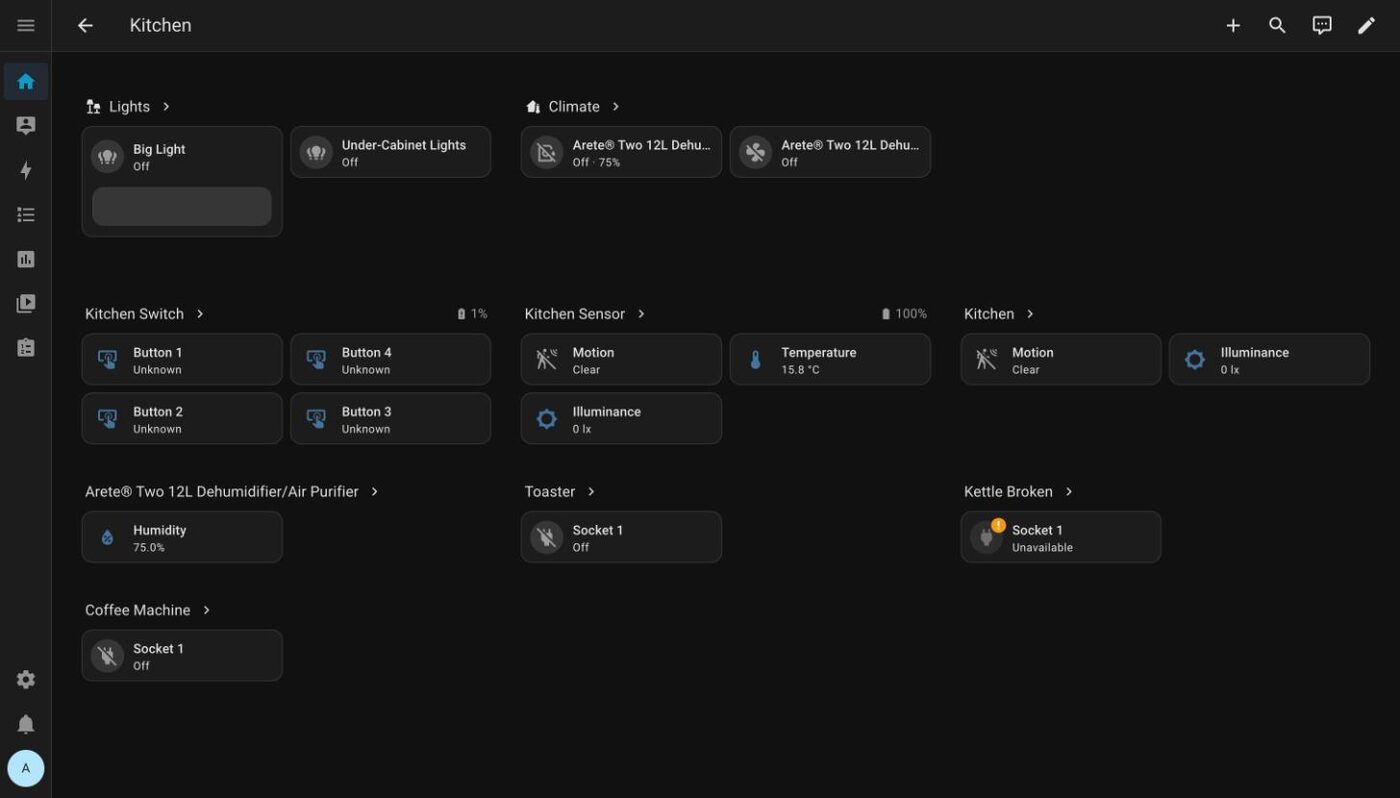
So the rules were written down before anything else went in.
- Rooms are rooms you can stand in. A light strip is a device in a room, not a room. Floors group the rooms: Downstairs, Upstairs, Loft.
- Name at the source. Tidy the names in the Hue app, Smart Life, Tapo and Govee first, because Home Assistant copies whatever they say.
- Appliances are not lights. The toaster, the kettle, the coffee machine and the electric blanket are all on smart plugs. They get an appliance label and no voice access, and they’re never in a group. “Kitchen lights on” must never reach the toaster.
- Plugs that power lamps get Show As Light, so they behave like the lamps they are.
The Philips Hue bridge had a twist I’d never have found myself. Removing and re-adding it would have brought all the old names straight back, because Home Assistant remembers deleted devices for 30 days. Claude found that by reading Home Assistant’s own source code, then fixed it in place instead: 17 entity IDs regenerated from the clean names, nothing re-paired.
The first automation, designed by asking
The first automation was the kitchen under-cabinet lights on motion. Simple enough, but I described it the way I’d say it: come on when I walk in and it’s dark, don’t mess with them if I’ve switched them on myself, and go off when I’ve gone.
Claude asked the questions I wouldn’t have thought to. What counts as dark? Instead of guessing a lux number, it read the motion sensor’s own light history and picked the threshold from that. What if I’d turned the lights on by hand? Then the automation leaves them alone. How long after the last movement? Three minutes.
That’s the whole method, really. I say what I want in plain words. Claude turns it into triggers, conditions and helpers, asks about the edge cases, and writes it into Home Assistant. Then the house runs it, every time, without any AI at all.
Lots of ifs, no thinking
Once you’ve got a dozen of these, something odd happens. The house starts to look clever.
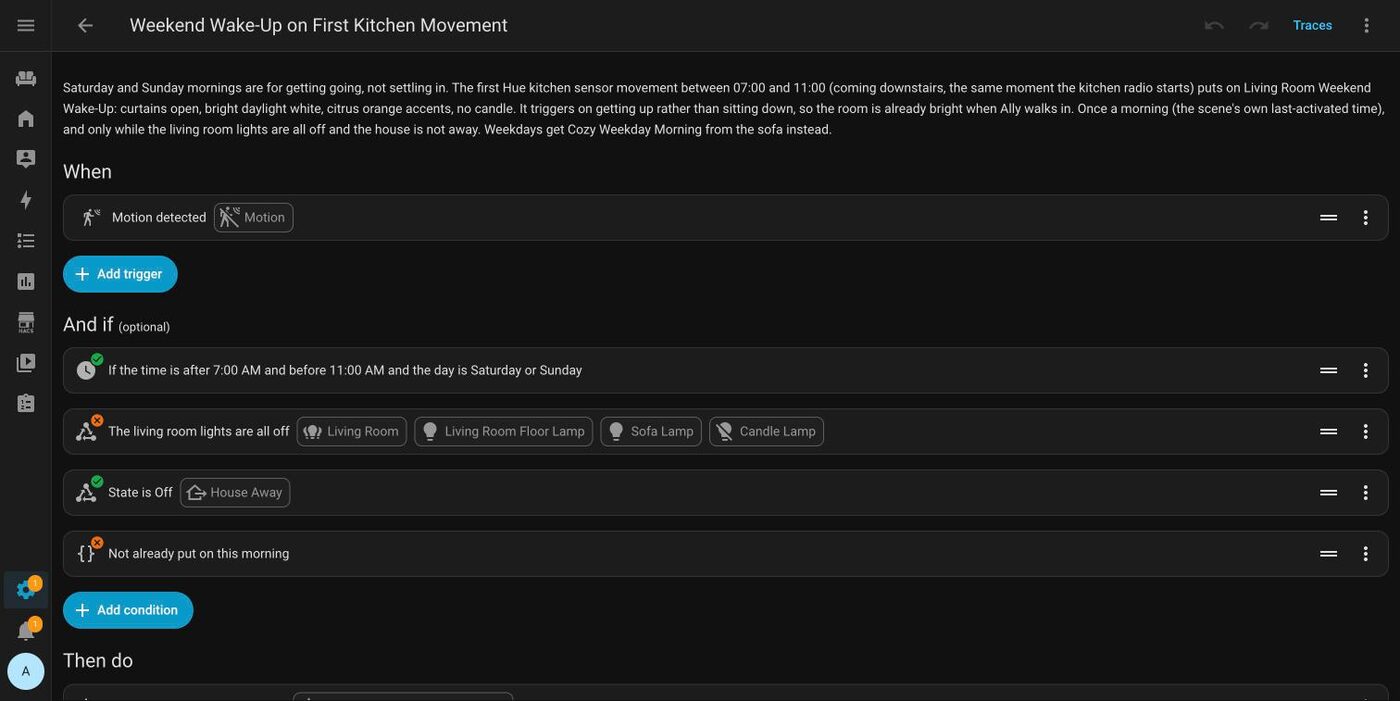
On weekday mornings, if I sit on the sofa, the living room goes warm amber and low, to ease me into a working day. At the weekend it doesn’t wait for the sofa, because the sofa is the trap: coming downstairs opens the curtains and puts on bright daylight white, to get me out of my sleepy state so I don’t waste the day.
On Thursday and Friday, my office days, the first movement at the front door between seven and nine gets me a brief: keys, wallet, phone, rain if it’s forecast, the rest of my calendar, and the gym kit if I haven’t been yet this half of the week. On a Thursday it adds the bike. After half past eight it adds the bike on a Friday too, because by then I won’t make it walking.
And every announcement starts with a bell and a two-second pause, because the first version just started talking out of nowhere and made me jump.
The house is as dumb as it ever was. It’s just been very well taught.
None of that is intelligence. It’s combinations: day of the week, time of day, which sensor saw me, where my phone has been, what’s on the calendar. The trick is that there are a lot of them, and they were worked out in advance by something that’s good at thinking through combinations, so the house doesn’t have to think at all.
For the Home Assistant people, here’s the whole gym trick. A zone, an
input_datetime that gets stamped when my phone leaves it, and this in the
welcome message:
{% set g = state_attr('input_datetime.last_gym_visit',
                      'timestamp') %}
{% if g and now().timestamp() - g < 4 * 3600 %}
  Good work at the gym.
  Did you take your sweaty gym clothes out to wash?
{% endif %}
It isn’t all smooth. The weekday kitchen radio is meant to go off when I sit down, but only if the house turned it on. The first test failed, because the sofa sensor never noticed me leaving: it said occupied the whole time. The fix was two sensors covering for each other: the kitchen has been empty for two minutes, and the sofa is occupied. That’s the sort of thing you only find by watching it fail, and the failures are going in the video too.
Why not just put the AI in the house?
I will, at some point. There’ll be a Claude API key in there eventually, for the things that need judgement.
Most of what makes a home feel smart doesn’t need judgement, though. It needs someone to have thought it through properly, once. Rules run on the box in the corner, the same way every time, for nothing. And I can open any one of them and read exactly why the house did what it did.
What’s next
This is part one. Part two is remote access, presence, and getting Alexa and Home Assistant to pass the baton: Alexa does the talking, and Home Assistant does everything else. After that comes the heating, which taught me that every app can say everything’s fine while the house is cold.
The house also keeps score of my habits now, gym visits included, and it sulks when I skip one. That’s an article of its own.
All of this is becoming a YouTube series too, built from the screenshots I took along the way. When the first one’s up, it’ll be linked here.